

 The Terminal Dev Stack I Wanted 10 Years Ago
Neovim, AstroNvim, tmux, modern language servers and a new generation of terminal tools now cover most of my everyday development work — while AI makes the whole stack dramatically easier to configure and learn.
Read
The Terminal Dev Stack I Wanted 10 Years Ago
Neovim, AstroNvim, tmux, modern language servers and a new generation of terminal tools now cover most of my everyday development work — while AI makes the whole stack dramatically easier to configure and learn.
Read
After 145 days of uninterrupted uptime, it was time to type one of those commands that feels slightly more consequential when the machine in question quietly runs half of your digital life:
rebootBy that point, the server had moved roughly 51 TiB inbound and 5 TiB outbound according to btop.
It had been serving websites, storing files, collecting metrics, recording cameras, receiving television, running home automation, resolving DNS, hosting databases, building software, processing weather data, coordinating IoT devices and doing dozens of other small jobs that are easy to forget until the machine is unavailable.
And I had just upgraded it from Debian 12 Bookworm to Debian 13 Trixie.
A major operating-system upgrade is probably the most brittle state such a server can enter. For a while, you deliberately create a system consisting of an old running kernel, newly replaced userspace libraries, processes still holding old binaries in memory, stopped services, upgraded services, temporarily disabled third-party repositories and a new kernel waiting for its first boot.
Yet a few hours later everything was back.
Not merely back, either.
The machine was running with dramatically lower load, roughly half the memory consumption and more than 10 GB of old packages and debris removed.
The interesting part is not that Debian can be upgraded.
The interesting part is what this says about running a serious home server on plain Linux, directly on the hardware, without putting Proxmox underneath everything and without reflexively wrapping every daemon in Docker.
The server that quietly became infrastructure
This is not a dedicated NAS or an old laptop running Pi-hole.
It is my main local Linux server and effectively the backbone of my infrastructure.
Among other things, it runs:
- local PHP applications and development environments
- MariaDB and Valkey
- Samba and general NAS duties like TimeMachine backups
- CoreDNS
- MQTT
- openHAB and home automation
- TVHeadend with a Digital Devices DVB card
- WeeWX and weather-station processing
- Prometheus monitoring for the wider infrastructure
- Grafana
- UniFi Network Server
- Frigate NVR with video analysis
- remote and local backups
- scheduled jobs, synchronization and automation scripts
- various development tools
- a collection of Docker containers where containers actually make sense
- internal software such as Mainframe and PentaPaper
It is a complex workload.
That does not mean it needs a complex architecture.
That distinction matters.
A surprising amount of homelab discussion starts from the assumption that every new service should become another Docker container, another VM, another LXC container or another layer under a hypervisor.
I use all of those technologies where appropriate.
I just don't consider them goals in themselves.
Sometimes the cleanest architecture for a service really is:
systemd
   ↓
service
rather than:
hypervisor
   ↓
virtual machine
   ↓
container runtime
   ↓
container
   ↓
service
Modern Linux is extraordinarily good at running multiple workloads simultaneously. That is one of the things Unix-like systems have spent decades becoming good at.
DNS consumes almost nothing. MQTT mostly waits. Web applications are bursty. MariaDB caches useful data and sleeps between queries. openHAB reacts to events. TVHeadend spends much of its life moving streams. Prometheus periodically scrapes metrics. WeeWX wakes up to process measurements.
Even something comparatively substantial like Frigate does not mean the rest of the machine suddenly needs its own cluster.
Most workloads do not peak simultaneously.
That makes consolidation extremely efficient.
Bare metal does not mean a snowflake server
There is another assumption I increasingly disagree with: that installing software directly on Linux inevitably means endless manual configuration, forgotten files under /etc, mysterious package conflicts and a machine nobody dares to touch after three years.
It certainly can mean that.
It doesn't have to.
This server is managed using Ansible. Its important configuration is infrastructure as code. Services are monitored. Data is backed up. Most software comes either directly from Debian or from a small number of deliberate upstream repositories.
The operating model is closer to professional infrastructure than to a collection of shell commands copied from forum posts.
That changes the risk model substantially.
If a machine fails, the important question is not:
Can I somehow repair this exact installation?
It is:
Do I understand the state well enough to reproduce it?
Those are very different situations.
It is the same philosophy behind my backup strategy. I have written separately about why I don't blindly consider RAID1 a substitute for backups on a machine like this. Mirroring protects against a particular hardware failure. It does nothing useful when I accidentally delete a file and the deletion is immediately mirrored to the second disk.
For some datasets, periodic synchronization to additional drives—some of which can remain spun down most of the time—is a much better match for the actual failure modes I care about.
The principle is the same throughout the system:
design around the problem, not around the fashionable solution.
A major upgrade is where this architecture gets tested
Normal operation proves surprisingly little.
A service that has been running for two years can continue running because nobody has disturbed it.
A major distribution upgrade is different.
This is where dependencies move underneath you.
At one point during the Debian 12 → Debian 13 migration, the conceptual state of the machine looked approximately like this:
old running kernel
+
partially upgraded userspace
+
old processes with old libraries mapped
+
new libraries on disk
+
some stopped services
+
some already upgraded services
+
third-party repositories temporarily disabled
+
new kernel modules being built
+
new kernel waiting for first boot
This is precisely the moment where configuration debt becomes visible.
Old signing keys fail.
Kernel modules stop compiling.
Services depend on Java versions you forgot about.
Python environments point at interpreters that no longer exist.
Configuration files have changed upstream.
Ansible itself starts warning about patterns that were perfectly normal several years ago.
And eventually you reach the point where the only way to know whether the new system actually works is to reboot it.
That is a much more meaningful test of maintainability than another 100 days of uptime.
Preparing Bookworm for Trixie
I did not want APT simultaneously solving Debian's entire distribution transition and half a dozen external repositories.
So the first objective was to simplify the package layer.
I replaced the old-style Debian repository configuration with a modern deb822 source:
Types: deb
URIs: https://deb.debian.org/debian
Suites: trixie trixie-updates
Components: main contrib non-free non-free-firmware
Signed-By: /usr/share/keyrings/debian-archive-keyring.gpg

Types: deb
URIs: https://security.debian.org/debian-security
Suites: trixie-security
Components: main contrib non-free non-free-firmware
Signed-By: /usr/share/keyrings/debian-archive-keyring.gpg
I also moved from a fixed German Debian mirror to deb.debian.org.
There is nothing inherently wrong with a good national mirror, but Debian's CDN-backed endpoint is a nicer default for infrastructure that should work regardless of where I eventually deploy it.
Bookworm backports were removed. Old source-package entries I did not use disappeared. Third-party repositories were temporarily taken out of the equation.
Then came the normal staged transition:
apt upgrade --without-new-pkgsfollowed by installing the new kernel and headers, and ultimately:
apt full-upgradeThe important thing was not to rush the reboot.
As long as the old kernel and the existing SSH session remained alive, I still had a very comfortable recovery environment.
The first real snag: ZFS and DKMS
The new Debian 13 kernel initially failed to configure.
Not because the kernel was broken, but because DKMS attempted to rebuild an old ZFS module against it and failed.
That failure propagated upward:
zfs DKMS build fails
        ↓
kernel postinst fails
        ↓
linux-image remains unconfigured
        ↓
headers remain unconfigured
        ↓
kernel meta packages remain unconfigured
This is exactly why I prefer understanding dependency chains instead of treating an APT error as an opaque wall of red text.
The kernel was fine.
ZFS was the problem.
Updating the ZFS stack to the Trixie-compatible version via apt install zfs-dkms zfsutils-linux and rerunning DKMS solved it. The kernel configured normally afterward.
No reinstall. No recovery environment. No mystery.
NodeSource met Debian's stricter crypto policy
Another interesting failure appeared when bringing Node.js back.
Debian 13 rejected the existing NodeSource repository signature because the signing key still had an old SHA-1 certification signature in its chain.
APT was quite explicit about it:
Policy rejected non-revocation signature
because SHA1 is not considered secure
Again, the system was doing exactly what it should.
The fix was not to weaken APT's security policy. It was to replace the obsolete NodeSource key and repository definition with their current one.
I used the opportunity to install Node.js 24 cleanly, together with Yarn 4, rather than preserving an old development runtime for historical reasons.
That is one recurring benefit of major upgrades: they create a natural point to ask whether old infrastructure should actually survive the migration.
Sometimes the correct migration strategy is deletion.
Java got simpler too
openHAB had accumulated a small JVM museum over time:
Zulu 11
Zulu 17
Zulu 21
OpenJDK 11
OpenJDK 17
...
Most of that was history, not architecture.
Debian 13 provides a perfectly suitable OpenJDK 21 environment, so openHAB now simply uses:
JAVA_HOME=/usr/lib/jvm/java-21-openjdk-amd64The old Azul repository could disappear.
The obsolete runtimes could disappear.
openHAB came back on Debian's native OpenJDK 21 without drama.
That is an improvement I value more than replacing one Java distribution with another: one external repository less, one vendor-specific dependency less, one smaller maintenance surface.
Python 3.13 exposed old pipx environments
Debian 13 also moved the system to Python 3.13.
My pipx environments had naturally been created using the previous interpreter, which meant tools such as Ansible initially stopped working.
Again, nothing conceptually difficult:
pipx reinstall-all --python python3.13and the isolated environments were rebuilt cleanly.
This is one of those places where modern Python packaging is much nicer than the historic habit of throwing arbitrary packages into the system Python with sudo pip install.
The Debian Python installation remains Debian's responsibility.
CLI applications live in pipx environments.
The boundary is clear.
Modernizing Ansible along the way
Once Ansible itself was alive again, the operating-system upgrade exposed a handful of deprecations.
None of them were particularly dramatic.
Repository management moved from the old:
apt_repository:toward:
ansible.builtin.deb822_repository:which fits nicely with Debian's modern .sources format.
MariaDB-specific automation could use the MariaDB collection rather than carrying old MySQL-oriented module names forever.
After the necessary adjustments, a full real Ansible run completed with:
ok=346
changed=41
unreachable=0
failed=0
skipped=35
rescued=0
ignored=0
That result mattered to me almost as much as the applications working.
The server was not merely operational.
Its desired state still converged.
Infrastructure & operations
Need this kind of infrastructure thinking professionally?
Through Neoground, I work on Linux systems, hosting, platform operations, modernization, reliability, and the less glamorous technical foundations that good digital systems depend on.
The DVB driver mystery that turned into good news
TVHeadend was one component I expected might become annoying.
The server has a Digital Devices DVB card. Years ago I installed their external dddvb driver manually:
make
make install
depmod
Eventually I added the same process to Ansible.
There was no DKMS integration.
Yet somehow the card had continued working across kernel upgrades for years.
After booting Debian 13, TVHeadend worked immediately.
The loaded module lived here:
/lib/modules/6.12.107+deb13-amd64/kernel/drivers/media/pci/ddbridge/ddbridge.ko.xzThat path gave away what had happened.
It was no longer my manually built external driver at all.
The Linux kernel's own in-tree ddbridge driver now supports the hardware well enough that at some kernel transition the system simply fell back to the native driver.
I never noticed because nothing stopped working.
That may be my favorite kind of infrastructure migration.
No announcement.
No rewrite.
The dependency simply became unnecessary.
And if the in-tree kernel driver continues to do everything I need, the correct next step is not to invent a sophisticated DKMS setup for the old external driver.
It is to delete the external driver automation.
Then came the reboot
At this point the machine was in exactly the state that makes remote upgrades psychologically interesting.
The package upgrade was complete.
The new kernel existed.
ZFS built successfully.
SSH was functioning.
But various long-running processes were naturally in strange transitional states after a major userspace replacement.
Samba had been stopped.
openHAB had been stopped.
Some services had old libraries mapped.
Others had already restarted with new ones.
There was no reason to debug that temporary universe.
After 145 days, it was simply time to reboot.
The shutdown even offered one last little moment of suspense. A second reboot command briefly returned:
Failed to set wall message, ignoring: Transport endpoint is not connected
Call to Reboot failed: Transport endpoint is not connected
The machine had already torn down part of its IPC environment and was waiting for some remaining stop jobs.
A little later, SSH reset.
That was the actual reboot.
A couple of minutes later the machine answered again.
Debian 13.
New kernel.
And then came the pleasantly boring part.
Everything worked
Samba worked.
TVHeadend saw the tuner and received television.
The PHP applications worked.
MariaDB worked.
Valkey worked.
Docker came back with its containers.
Frigate resumed video analysis.
openHAB worked on the new OpenJDK.
Prometheus and Grafana came back.
WeeWX worked.
MQTT worked.
Node 24 and Yarn 4 worked.
My own local applications worked.
One failed service remained: OpenIPMI.
The machine has no IPMI hardware.
It turned out to be installed indirectly because a Prometheus collector package depends on ipmitool.
So I disabled the useless service and moved on.
That was essentially it.
The performance result surprised me
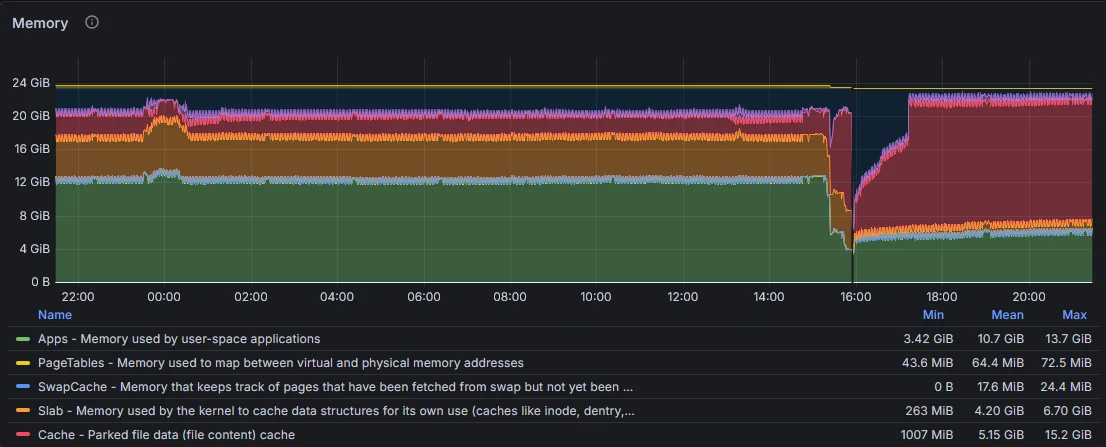
Before the upgrade, the system had gradually become noticeably busier.
Around six months earlier, a normal workload looked roughly like this:
| State | Load average | RAM usage |
|---|---|---|
| Earlier baseline | 2.0 / 2.4 / 2.5 | 11–12 GB |
| Immediately before upgrade | 3.61 / 4.24 / 3.75 | ~14 GB |
| Debian 13, several hours later | 1.15 / 1.34 / 1.56 | ~6.6 GB |
CPU utilization also settled around 12% under normal workload.
And the machine simply feels sharper.
Terminal interaction is more immediate. Web applications feel slightly crisper. Package downloads through the Debian CDN are quicker. The whole system feels less encumbered.
I would not turn this into the claim that:
Debian 13 uses half as much RAM as Debian 12.
That would be bad benchmarking.
I rebooted a machine that had been running for 145 days. I removed obsolete runtimes. I rebuilt processes from clean state. I upgraded a large part of userspace. I cleaned old packages and changed Java and Node environments.
Those effects cannot be isolated from one another.
But the operational result is still real:
The same practical workload now runs with dramatically lower load and memory consumption than it did immediately before the migration.
Several hours later, the numbers remained low.
That is useful capacity returned to the system.
56 TiB is a lot of “homelab”
One statistic from the old uptime stuck with me.
btop reported roughly:
51 TiB received
 5 TiB transmitted
during those 145 days.
That is not all internet traffic, of course. A server like this moves substantial amounts of local video, monitoring data, backups, media and application traffic.
But it illustrates an important point.
This machine is not a decorative homelab dashboard.
It does actual work.
Every day.
It records cameras.
It handles television.
It stores files.
It hosts applications I use.
It coordinates my smart home.
It collects weather data.
It monitors other machines.
It runs databases.
It builds software.
It moves backups.
It is infrastructure.
And despite all of that, after the upgrade it sits at a load average around 1.3 with roughly 6.5 GB of RAM in use.
Modern computers are absurdly capable when we let them be.
You don't need to Dockerize everything
I like Docker.
Frigate is a great example of a workload where a container makes sense for me. So are several other services on this server.
But containers solve particular problems.
They are not a moral obligation.
If Debian already has a mature package for something and the service integrates naturally with the host, installing it directly can be the simpler solution.
Native services get:
- systemd lifecycle management
- normal journal integration
- conventional filesystem locations
- distribution security updates
- direct hardware access where appropriate
- straightforward networking
- fewer abstraction layers
Containers give me:
- packaging isolation
- controlled dependency environments
- convenient upstream distribution
- easy removal
- useful boundaries for applications with complex runtime requirements
I use both.
That is the architecture.
Not “bare metal versus Docker.”
Not “Proxmox versus Debian.”
Use the smallest abstraction that solves the problem well.
Complexity of workload is not complexity of architecture
This is perhaps the central lesson.
The server does a lot.
But the mental model remains fairly simple:
                    Local network
                         │
        ┌────────────────┼────────────────┐
        │                │                │
      DNS/MQTT       Applications      Automation
        │                │                │
        └────────────────┼────────────────┘
                         │
              ┌────────────────────┐
              │     Debian 13      │
              │                    │
              │ Native services    │
              │ Docker workloads   │
              │ Databases          │
              │ Storage            │
              │ Media / DVB        │
              │ Monitoring         │
              │ Dev tooling        │
              └────────────────────┘
                         │
                   Ansible IaC
                         │
                Backups / restore
There is one general-purpose operating system underneath it.
I can inspect processes normally.
I can inspect network sockets normally.
I can read logs normally.
APT knows about packages.
systemd knows about services.
Ansible knows about configuration.
Prometheus knows about performance.
Backups know about state.
That simplicity is valuable.
AI makes maintenance easier, but judgment still matters
There was another difference between this upgrade and similar maintenance ten years ago: troubleshooting unfamiliar edge cases is dramatically faster now.
When ZFS DKMS failed, when NodeSource hit Debian's stricter signature policy, when an Ansible deprecation appeared or when I wanted to verify what a particular transition implied, I could reason through it with AI immediately instead of spending twenty minutes assembling the right combination of search terms and comparing outdated forum posts.
That does not remove the need to understand the system.
Quite the opposite.
AI is most useful here when you already understand enough to evaluate the answer, inspect the dependency chain and decide whether a proposed command makes sense on your machine.
It compresses the research loop.
It does not replace operational judgment.
For maintaining complex personal infrastructure, that is nevertheless a substantial improvement.
AI & applied technology
Exploring what AI could actually do for your organization?
Through Neoground, I help companies move beyond AI demos and identify where models, automation, and software can create useful capabilities in real workflows and systems.
Major upgrades are a test of engineering quality
Uptime is satisfying.
But uptime alone can also hide fragility.
A machine that has not rebooted in 500 days may be wonderfully stable—or it may simply contain 500 days of accumulated assumptions nobody has tested.
A major operating-system upgrade forces those assumptions into the open.
Can the kernel change?
Can dependencies change?
Can services restart?
Can the configuration still be reproduced?
Can you understand failures when they happen?
Can you replace an obsolete dependency rather than endlessly preserving it?
Can you reboot and reasonably expect the system to return?
That is why I came away from this migration more confident in the architecture than before.
It survived change.
Four hours well spent
From beginning the Debian 12 → Debian 13 migration to having the machine fully operational, cleaned up and Ansible-convergent again took roughly four hours.
The significant issues were:
- updating Debian repository configuration
- a ZFS DKMS incompatibility
- replacing an obsolete NodeSource signing key
- rebuilding pipx environments for Python 3.13
- moving openHAB to Debian's native OpenJDK 21
- cleaning old Java and Python runtimes
- adjusting a handful of modern Ansible conventions
There was no disaster.
No reinstall.
No prolonged outage.
No hunting for forgotten configuration scattered across an undocumented machine.
And no trip to the basement to find an old display because SSH never came back.
The result is a cleaner Debian 13 server with fewer external dependencies, a modern development stack, less disk usage, substantially lower load and much lower memory consumption.
Most importantly, it still quietly does everything it did before.
That is what I want from infrastructure.
Not architectural spectacle.
Not maximum abstraction.
Not the largest possible collection of platforms between the hardware and the application.
Just a system whose complexity is proportional to the problems it actually solves.
Sometimes that can still be one very capable Linux machine.
And sometimes the best indication that you built it well is that even the scary upgrade turns out to be pleasantly boring.
Professional work
Need help turning a complex technology problem into something workable?
I work with founders and organizations through Neoground on software, infrastructure, AI, and strategic technology questions — from focused reviews to larger systems and advisory engagements.

No Comments Yet
Add a comment