

 145 Days of Uptime, 56 TiB of Traffic, One Debian Upgrade
What upgrading the Debian server that runs my smart home, NAS, NVR, TV, monitoring, development environment and local applications taught me about modern bare-metal Linux.
Read
145 Days of Uptime, 56 TiB of Traffic, One Debian Upgrade
What upgrading the Debian server that runs my smart home, NAS, NVR, TV, monitoring, development environment and local applications taught me about modern bare-metal Linux.
Read
I have used Vim on Linux systems for many years. Including countless production systems.
Not because I never figured out how to quit it.
It is simply productive.
For changing a configuration file, fixing a script or quickly inspecting something over SSH, starting a full graphical development environment never made much sense. Vim starts instantly, exists almost everywhere and works exactly the same across a local terminal, a server console or an SSH connection.
But there was always a fairly obvious boundary.
For serious application development I went back to JetBrains IDEs. PhpStorm in particular gives me excellent PHP intelligence, refactoring, project navigation, debugging, Git integration, database tooling and a tremendous amount of contextual information.
Classic Vim could edit the same files. It could not realistically compete with that experience.
I have revisited the idea of a more comprehensive terminal development environment several times over more than a decade. The answer was always approximately the same: technically possible, provided I was willing to spend enough time assembling plugins, memorizing obscure commands and accepting compromises.
This time was different.
After using my current setup for real development for a while, it now covers perhaps 95% of my ordinary development work. Not 95% of every obscure feature PhpStorm can provide, but roughly 95% of what I actually need on a normal day.
That includes substantial PHP projects, JavaScript and SCSS, Ansible, shell scripts, Python utilities, Markdown, configuration files, Git work, databases and the usual Linux plumbing around all of it.
I have not replaced my IDE.
I have replaced the assumption that I need to launch one whenever I want to program.
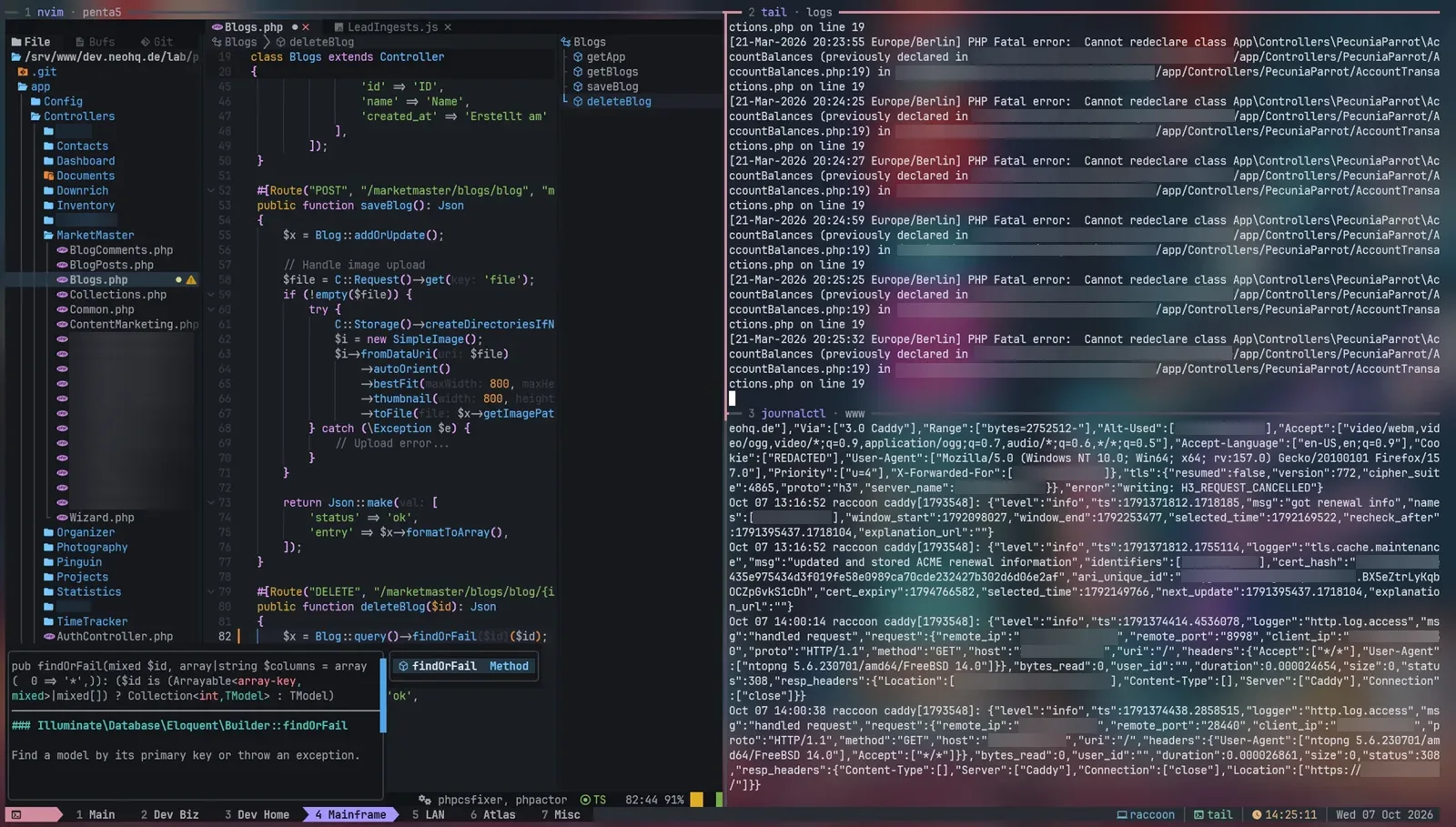
The terminal stack finally grew up
The interesting part is not one particular Neovim plugin.
Several layers matured at roughly the same time.
Neovim evolved Vim into a much better programmable editor platform. Language Server Protocol became broadly adopted. Tree-sitter provides structural understanding of source code. Modern completion engines became fast and polished. Plugin managers became considerably less painful.
And the surrounding terminal ecosystem changed just as much.
Tools such as ripgrep, fd and fzf made searching huge directory structures effectively instantaneous. New terminal UIs written in Rust and Go stopped looking like glorified menus and started feeling like proper applications.
Modern terminals gained true color, good Unicode support and Nerd Fonts, which means a terminal UI can use meaningful icons, diagnostics, Git symbols, file type indicators and attractive status bars without becoming unreadable ASCII art.
The result is not really “Vim with more plugins”.
It is a modular development platform.
My current stack roughly looks like this:

Neovim is the centerpiece, but it is not expected to do everything.
That turns out to be important.
AstroNvim: Neovim without spending a weekend building Neovim
A bare Neovim installation remains fairly minimal.
You absolutely can build your own configuration from scratch, and plenty of people do. kickstart.nvim is an excellent documented starting point if that is what you want.
There are also mature distributions such as LazyVim and NvChad.
I chose AstroNvim.
Not because I conducted a six-month scientific editor-distribution benchmark. It is popular, actively maintained, looked coherent and attractive, has a large community configuration repository and seemed like a sensible base to customize.
It worked out rather well.
AstroNvim is not a separate editor. It is a curated configuration and integration layer around Neovim.
Getting started is almost disappointingly easy
The first important requirement is a recent Neovim.
Fast-moving Neovim distributions tend to target current Neovim releases, while conservative Linux distributions may ship older packages. Check:
nvim --versionIf your package repository is current enough, great.
Otherwise use one of Neovim's upstream installation methods or simply build a stable release yourself:
git clone https://github.com/neovim/neovim
cd neovim

git checkout stable

make CMAKE_BUILD_TYPE=RelWithDebInfo
sudo make install
Then AstroNvim's template gets you remarkably far:
git clone --depth 1 \
    https://github.com/AstroNvim/template \
    ~/.config/nvim

rm -rf ~/.config/nvim/.git

nvim
Start Neovim and the environment bootstraps its plugins.
That is already a radically different experience from the stereotype of spending a weekend growing a .vimrc.
AstroNvim currently integrates things such as fuzzy finding, completion, Git indicators, a project tree, Treesitter, native LSP support and debugging infrastructure. AstroCommunity adds reusable configurations for languages and workflows.
A language pack can be approximately this unexciting:
return {
  "AstroNvim/astrocommunity",

  { import = "astrocommunity.pack.php" },
}
From there I added the languages and tools I actually use rather than enabling the entire observable software ecosystem.
My setup covers PHP/Twig, JavaScript and TypeScript, HTML, CSS/SCSS, JSON, YAML/Ansible, Python, Bash, Go, Lua and Markdown.
The important thing is that I did not individually design an IDE for each one.
PHP was the test that actually mattered
Syntax highlighting for a Bash script is nice.
It does not prove much.
PHP is where I expected the difference between an editor and a real IDE to become painfully obvious.
I work with larger Composer applications, object hierarchies, service layers, framework code, vendor dependencies and enough types that simple text completion is not particularly useful.
For that I use PHPActor as the PHP language server.
And this is where things became surprisingly serious.
Consider something mundane:
final class InvoiceController
{
    public function create(InvoiceService $invoiceService): Response
    {
        $invoice = $invoiceService->generate(
            $customer,
            $amount,
            true,
        );

        // ...
    }
}
In the current setup I get:
- class and method completion;
- Composer/project awareness;
- automatic
useimports; - method signatures while typing;
- active parameter indication;
- parameter-name inlay hints;
- hover information;
- go-to-definition;
- references;
- implementation navigation;
- document and workspace symbols;
- semantic renaming;
- code actions;
- diagnostics;
- formatting;
- test and debugger integration.
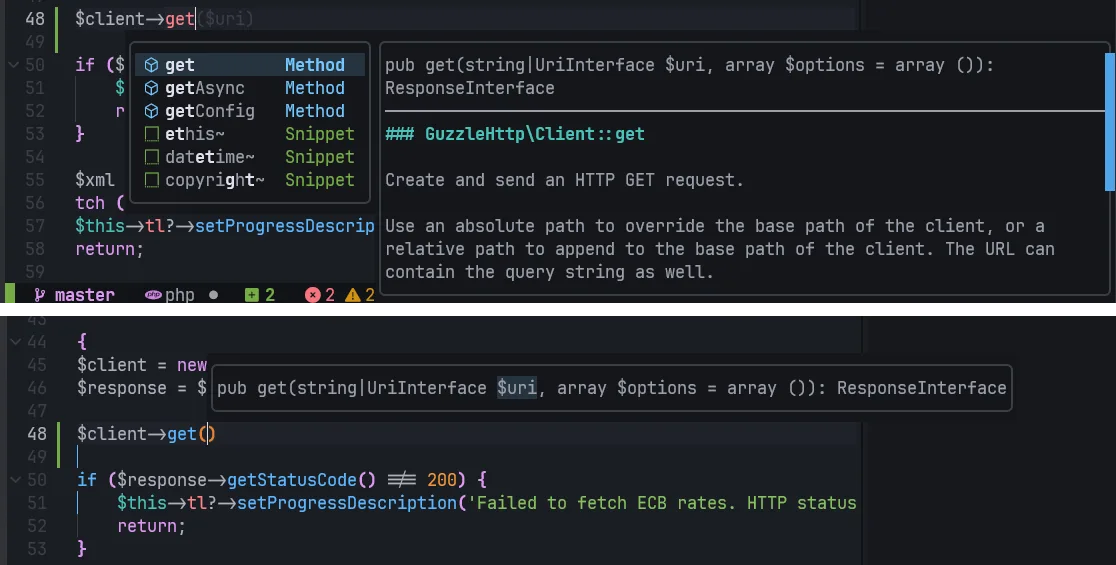
If I start typing a class name and select the completion candidate, the corresponding import can simply appear at the top of the file.
use App\Service\InvoiceService;That sounds mundane because every serious graphical IDE has done it forever.
That is precisely why it matters.
This is no longer a clever Vim trick. It is ordinary IDE functionality appearing inside a terminal editor.
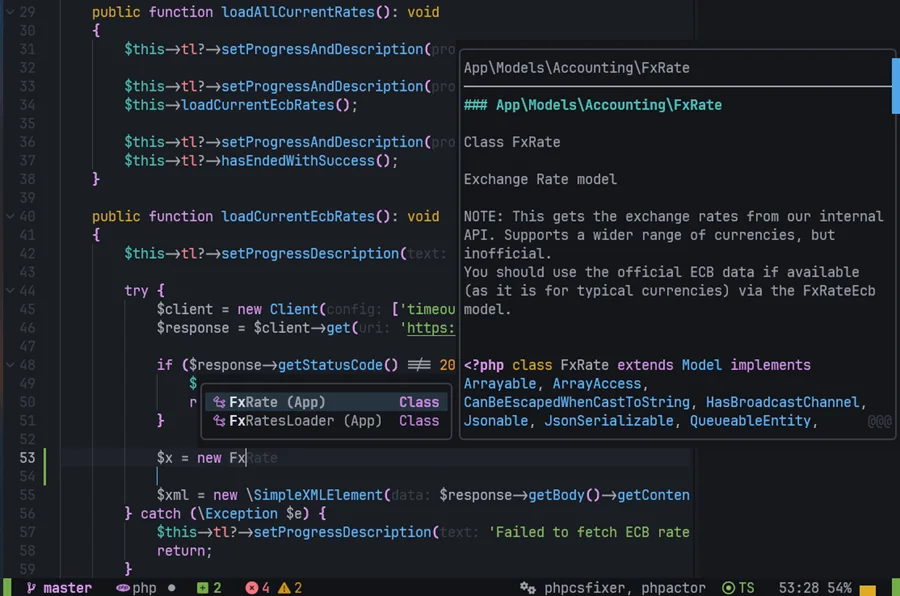
Small refinements make a large difference
AstroNvim currently uses blink.cmp for completion. Enabling automatic signature information is a tiny configuration adjustment:
return {
  {
    "saghen/blink.cmp",
    opts = {
      completion = {
        documentation = {
          auto_show = true,
          auto_show_delay_ms = 250,
        },

        ghost_text = {
          enabled = true,
        },
      },

      signature = {
        enabled = true,

        trigger = {
          enabled = true,
          show_on_trigger_character = true,
          show_on_insert_on_trigger_character = true,
        },

        window = {
          show_documentation = true,
        },
      },
    },
  },
}
Now typing:
$invoiceService->generate(can immediately show something along the lines of:
generate(Customer $customer, Money $amount, bool $send = false): Invoice
         ^^^^^^^^^^^^^^^^^^
and advance the active parameter as I type.
PHPActor can additionally provide parameter inlay hints:
phpactor = {
  init_options = {
    ["language_server_worse_reflection.inlay_hints.enable"] = true,
    ["language_server_worse_reflection.inlay_hints.params"] = true,
    ["language_server_worse_reflection.inlay_hints.types"] = false,
  },
}
I deliberately leave some information disabled. An IDE can become just as annoying as a terminal if every available annotation is permanently screaming at you.
The point is not maximum information.
It is having the information I want available when I want it.
Large projects do not feel large when navigation is instant
One of my favorite parts of the setup is almost boring: finding things.
In my configuration, <Space> is the leader key. Some of the mappings I use constantly are:
<Space>ff    find file
<Space>fw    search project text
<Space>fb    open buffers

gd           go to definition
grr          find references

<Space>lS    symbols / structure
<Space>la    code actions

<Space>gg    LazyGit
Exact mappings can naturally change between configurations and AstroNvim versions. The workflow is what matters.
ff and fw are extremely fast.
I can point them at a repository containing hundreds or thousands of files and results appear effectively immediately.
That performance is not accidental. The modern terminal ecosystem tends to compose specialized tools instead of reinventing them.
ripgrep is exceptionally good at recursively searching source trees while respecting Git ignore rules.
fd does the same kind of thing for filesystem discovery.
Neovim can put a polished interactive picker on top.
The result feels much closer to an IDE's “Search Everywhere” than to manually grepping a project — except it remains extremely fast.
And semantic navigation exists beside the text search.
If I want every textual occurrence of InvoiceService, I search the repository.
If I want actual references to the symbol under my cursor, I ask the language server.
Those are different operations, and having both instantly available is useful.
The same environment follows me into less glamorous files
PHP is a good stress test, but it is not where this setup saves me the most friction.
The larger advantage is continuity.
I may spend an hour in a PHP application and then need to edit:
roles/nginx/tasks/main.ymlfollowed by:
scripts/import-data.pythen:
README.mdand finally:
/etc/caddy/CaddyfileA full IDE can obviously edit all of those.
But launching or switching a heavyweight project environment for a 20-line Python utility, an Ansible role or a Markdown document feels excessive.
A simple text editor goes too far in the opposite direction.
Modern Neovim sits in a very useful middle ground.
For YAML and Ansible I can still have diagnostics, completion and structural understanding.
For Python I get language-server intelligence.
For Go there is gopls.
For TypeScript there is vtsls.
For Bash there are language servers and linters.
The user interface remains largely the same:
- completion
- definitions
- references
- diagnostics
- symbols
- rename
- code actions
- formatting
The semantic backend changes with the language.
That makes Neovim unusually useful for people whose work crosses application code, infrastructure and operating systems rather than living entirely inside one framework.
It is also useful as a second opinion.
PhpStorm and PHPActor do not necessarily surface exactly the same warnings. Linters and language servers can be more opinionated in different areas. My JetBrains setup might happily spell-check comments while the terminal stack complains about something entirely different.
Running the same project through different tooling occasionally reveals things the other environment did not emphasize.
tmux is the workspace, not an accessory
Neovim is the center of my coding setup.
tmux is the center of my terminal setup.
I have used it for countless years because the idea is fundamentally good: create a persistent terminal workspace, split it into whatever processes you need, detach from it and come back later.
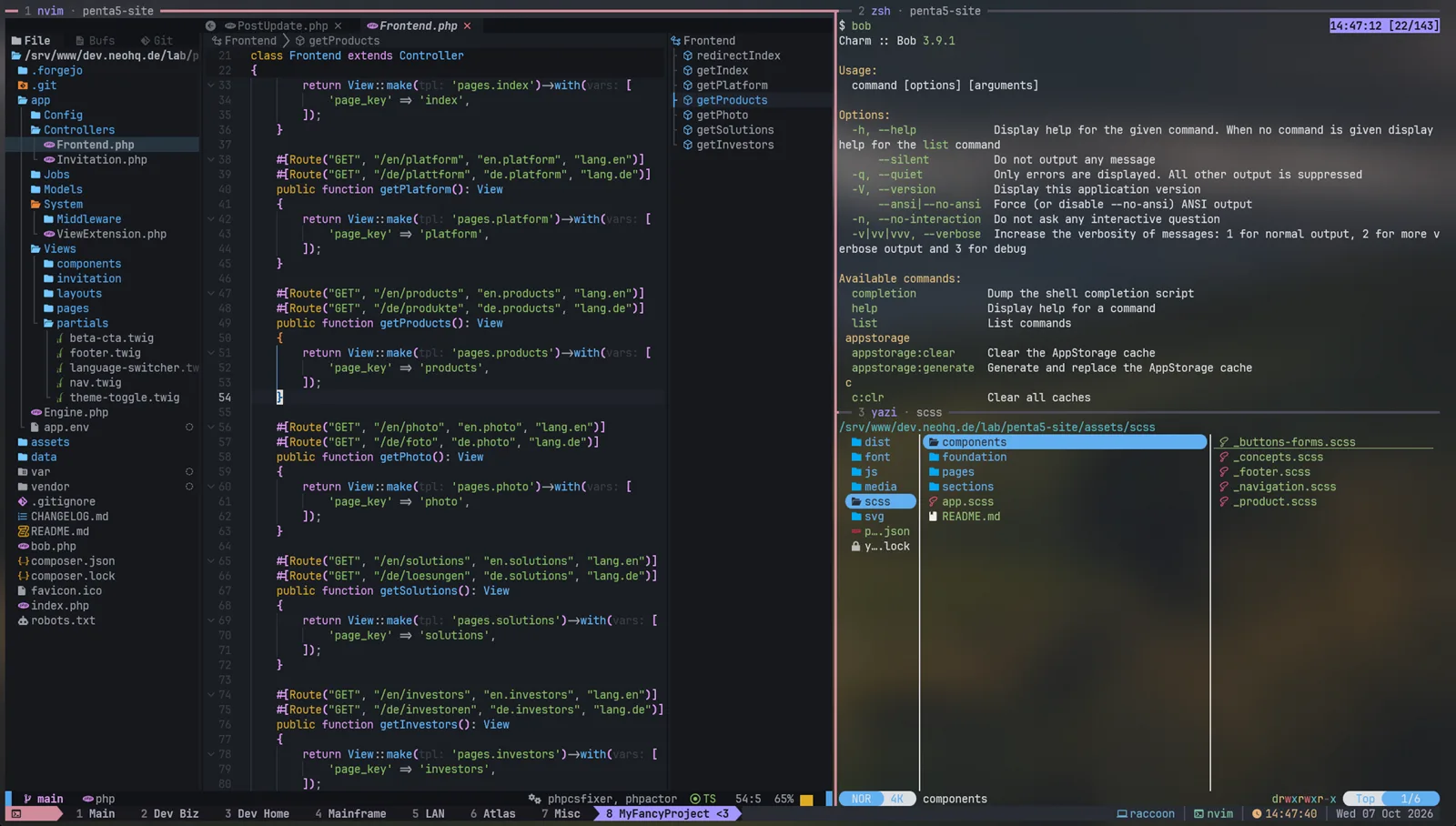
A normal project session might look like:
┌─────────────────────────────────┬──────────────────┐
│                                 │                  │
│ Neovim / AstroNvim              │ tail -F app.log  │
│                                 │                  │
│                                 │                  │
├─────────────────────────────────┼──────────────────┤
│ shell / tests                   │ btop             │
└─────────────────────────────────┴──────────────────┘
Another tmux window might contain Rainfrog for database work.
Another one may just be a shell.
The crucial part is that none of this needs to be embedded into Neovim.
Want live logs?
Use tail -F.
Want system monitoring?
Run btop.
Want a database interface?
Open Rainfrog.
tmux composes the tools into one workspace.
If my SSH connection disappears, the workspace continues running.
If I stop for the evening:
tmux detachand return the next morning:
tmux attachthe processes can still be sitting exactly where I left them.
That is extremely difficult to give up once it becomes normal.
Workspaces are trivial to automate
tmux is another application with a formidable manual and a large collection of key bindings.
It is also scriptable.
A tiny project launcher can already do something useful:
#!/usr/bin/env bash

set -e

session="${1:-dev}"

tmux new-session \
    -d \
    -s "$session" \
    -c "$PWD" \
    'nvim'

tmux split-window \
    -h \
    -t "$session:0" \
    -c "$PWD" \
    'tail -F var/log/app.log'

tmux new-window \
    -t "$session" \
    -n db \
    -c "$PWD" \
    'rainfrog'

tmux new-window \
    -t "$session" \
    -n monitor \
    'btop'

tmux select-window -t "$session:0"
tmux attach -t "$session"
Adjust that to the project and a complete development workspace appears with one command.
You can take this much further, but you do not have to.
That theme repeats throughout the stack.
The editor is only as good as the terminal around it
A good Neovim configuration inside a terrible shell environment would miss half the point.
I use Zsh with Oh My Zsh as another curated base.
Zsh itself is extremely capable but relatively plain until configured. Oh My Zsh provides the same kind of acceleration AstroNvim provides for Neovim: conventions, plugins, completion, Git awareness, themes and a large existing ecosystem.
Then I refine what I actually care about.
For example, eza makes an excellent modern ls replacement:
alias ls='eza --icons=auto --group-directories-first'
alias ll='eza -lah --git --icons=auto --group-directories-first'
With a Nerd Font, seemingly cosmetic things such as file icons become useful throughout the entire environment.
They appear in file listings.
They appear in Yazi.
They appear in Neovim's project tree.
They appear in status lines and pickers.
The terminal becomes a graphical environment in the literal sense — just one built out of cells instead of conventional desktop widgets.
Focused terminal applications are often better than another IDE panel
One mistake would be trying to force every possible development function into Neovim.
I do not want that.
For Git, LazyGit is excellent.
For the common workflow:
inspect changes
→ stage
→ commit
→ push
I often find it faster than navigating the equivalent IDE interface.
JetBrains offers a considerably richer Git environment, especially when merges become complicated. That remains useful.
But most commits are not complicated merges.
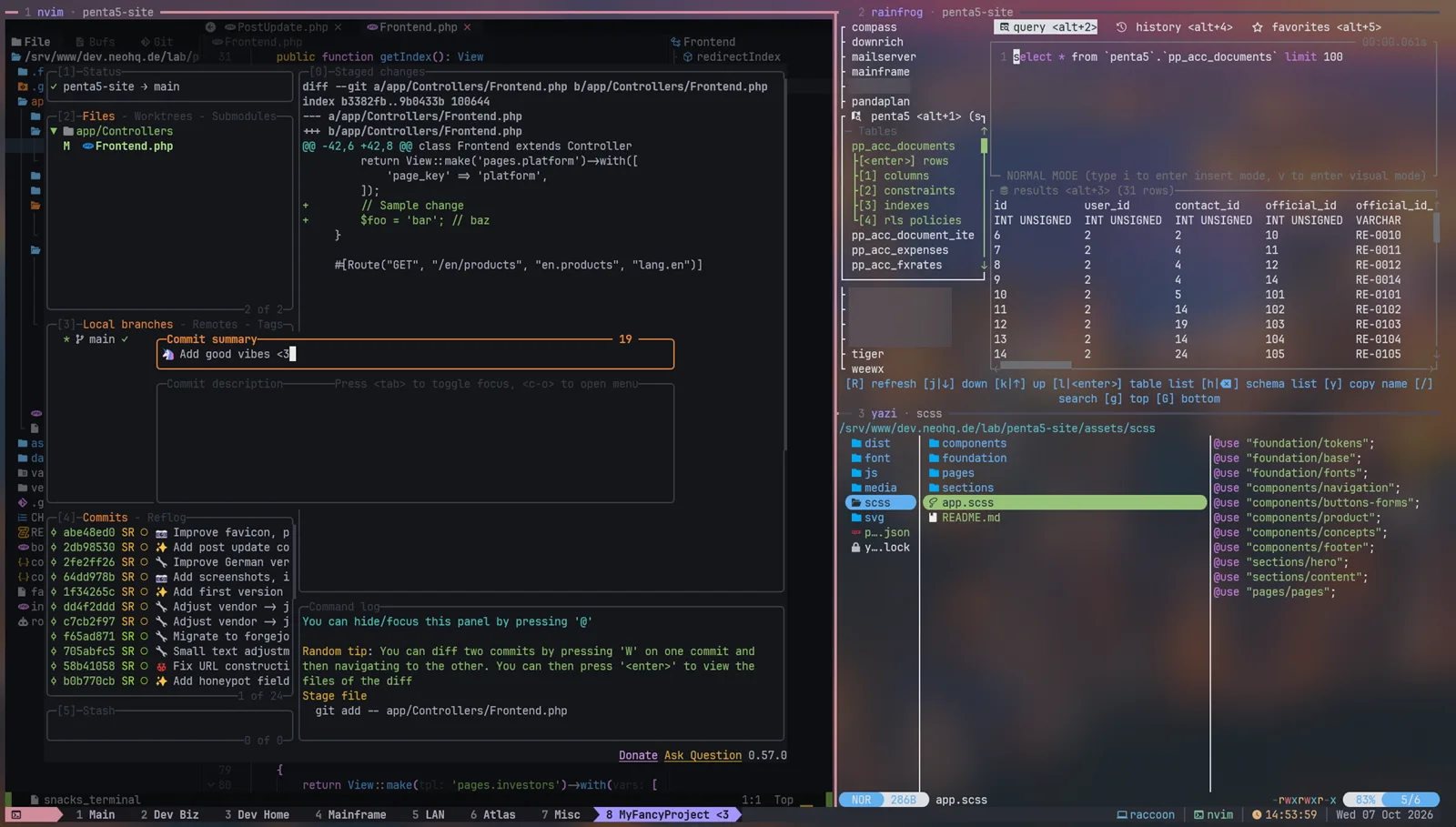
For files I use Yazi, a fast asynchronous terminal file manager written in Rust.
This is particularly useful once a task involves assets or moving around files in a way that does not naturally fit an editor's project tree.
For databases, Rainfrog gives me a focused terminal database interface.
I do not need 100% of DataGrip for every SQL query.
I need a useful table browser, schemas, queries and results.
That is the larger philosophy:
- Code: Neovim
- Git: LazyGit
- Filesystem: Yazi
- Databases: Rainfrog
- Composition: Tmux
- Shell: Zsh
Each tool can be excellent at one job.
And because they all live in the terminal, composing them is almost free.
AI removed a surprisingly large part of the old learning tax
There is another reason I finally managed to turn this into a coherent environment.
AI.
Not because an LLM can dump 1,500 lines of Lua into ~/.config/nvim and declare victory.
That would be the terminal equivalent of vibe coding a production platform and hoping the tests are decorative.
The more interesting use is technical translation and interactive teaching.
Complex terminal tools have historically had an enormous discoverability problem.
Suppose I know what I want:
While typing a PHP method call, show me its parameters and keep the current parameter highlighted.
I may not know that the relevant terms are LSP signature help, trigger characters and blink.cmp signature configuration.
Previously that meant searching documentation, forum posts, GitHub issues and configuration examples until I had mapped the behavior in my head onto the terminology used by several different projects.
Now I can describe the behavior.
AI can help identify the responsible layer and produce a tiny candidate configuration.
I still decide whether the result makes sense.
The same thing happened with automatic imports, PHPActor inlay hints, AstroNvim sessions, Neo-tree filtering, Aerial, Mason provisioning and numerous other small refinements.
More importantly, AI can teach the environment while I use it
This matters even more than configuration.
Vim has a huge command language.
tmux has plenty of commands and shortcuts.
AstroNvim adds mappings.
Individual plugins add more.
Nobody needs to stop programming for two weeks and read every manual from beginning to end before touching the editor.
If I want to know:
How do I replace only the text inside these quotes?
I can ask and get:
ci"Want the current parentheses?
ci(Delete a complete block including braces?
da{Delete the entire buffer contents?
ggdGThose are native Vim operations, not AstroNvim magic.
And that's another useful thing AI can explain: which layer owns the behavior.
Maybe the command is native Vim.
Maybe it is Neovim.
Maybe it is an AstroNvim mapping.
Maybe PHPActor provides it through LSP.
Maybe it belongs to a plugin.
That distinction is otherwise remarkably easy to lose when searching old answers online.
I can learn the 5% I need today, use it repeatedly, and gradually turn it into muscle memory.
That is a far more realistic way to learn an environment this deep.
Even the mouse is not forbidden
There is also no prize for making the environment unnecessarily hostile.
I use the keyboard heavily, but sometimes scrolling a file, clicking a pane or selecting something with the mouse is simply convenient.
Neovim:
vim.opt.mouse = "a"tmux:
set -g mouse onDone.
A terminal workflow does not have to become a Vim purity contest.
This is where AI feels different from “vibe coding”
I also use AI to refine the configuration into proper deployment code.
Once a change works, I can ask:
Turn this into an idempotent Ansible task for multiple users.
Or:
Build this tmux layout from a shell script.
Or:
My Linux distribution names
fdasfdfind; make the role handle that correctly.
The machine still has a deliberate architecture.
I know which packages are installed, where the binaries live, which language servers are enabled and what the configuration is supposed to accomplish.
AI reduces the time spent translating those decisions into unfamiliar configuration APIs.
That is very different from blindly asking it to “make me a Neovim config”.
My development environment is infrastructure
I happen to deploy the complete setup through Ansible.
That includes a current Neovim installation, the shared AstroNvim configuration, language tooling and several companion applications.
That means a new development machine does not require an archaeological expedition through my shell history.
Provision it, deploy the roles, start Neovim.
Other people may prefer dotfiles, Nix, chezmoi or a shell bootstrap script. It does not matter.
The useful property is that this entire environment consists of ordinary configuration and open tooling. It is reproducible.
That also makes experimentation less scary.
If I destroy my editor configuration while trying something clever, I know where the source of truth lives.
JetBrains still wins — and that is fine
I deliberately compare this setup with JetBrains because that is a difficult benchmark.
PhpStorm and IntelliJ-based IDEs are excellent professional tools. I have used them for years and I am not looking for an ideological reason to stop.
There are situations where I still prefer the IDE.
Complex structural refactoring is one.
Moving large groups of classes or modules around while having the IDE understand all affected references is exactly the kind of job an integrated semantic environment excels at.
Complicated Git merge resolution is another.
Graphical debugging and profiling can be considerably more pleasant.
Interactive visualizations, specialized database work, framework-specific tooling and asset-heavy tasks can all benefit from the integrated GUI.
And sometimes I simply want maximum comfort: every possible hint, inspection and action visible without remembering how the underlying editor exposes it.
That is valuable.
The interesting comparison is elsewhere.
| Task | Terminal stack | Full IDE |
|---|---|---|
| Quick config/script fix | Excellent | Usually excessive |
| Ansible / YAML / shell | Excellent | Depends heavily on IDE/plugins |
| Normal PHP development | Excellent | Excellent |
| Large PHP application navigation | Surprisingly good | Excellent |
| Fast file/text search | Excellent | Excellent |
| Routine Git commit/push | Excellent | Excellent |
| Large structural refactor | Capable | Usually better |
| Complex merge resolution | Capable | Usually better |
| Rich visual debugging | Capable | Better |
| Remote SSH workflow | Native | Requires remote workflow |
| Mixed Linux/admin/dev work | Excellent | Less natural |
| Visual assets / GUI-heavy work | Weak | Better |
This is not a competition where one side must disappear.
The important change is where the boundary moved.
The middle ground became enormous
There used to be an awkward gap.
A plain text editor was too primitive for many programming tasks.
A full IDE was excessive for them.
That gap includes a surprisingly large amount of real work:
- quick bug fix
- small PHP service
- Ansible role
- Python helper script
- Bash utility
- Markdown document
- configuration file
- normal feature work
- small frontend change
- code review
- Git cleanup
- remote debugging
That is exactly where this environment shines.
It starts instantly.
It works over SSH.
It understands the project.
It can follow symbols through a Composer codebase.
It can automatically import a PHP class.
It can tell me that an Ansible task is malformed.
It can search thousands of files almost instantly.
And when I need something outside the editor, tmux already gives me the place to put it.
For my own workload, that now covers roughly 95% of the development situations I encounter.
The remaining percentage contains some genuinely difficult jobs where a full IDE earns its weight.
That feels like a healthy split.
A small stack with a surprisingly deep rabbit hole
The funny part is that using the environment now feels fairly casual to me.
Underneath, however, there is quite a lot going on:
- Terminal emulator
- Nerd Font
- Zsh
- Oh My Zsh
- tmux
- Neovim
- AstroNvim
- AstroCommunity
- LSP
- Treesitter
- blink.cmp
- PHPActor
- Mason
- ripgrep
- fd
- fzf
- LazyGit
- Yazi
- Rainfrog
- linters
- formatters
- debug adapters
- Ansible deployment
That is undeniably a deep stack.
The achievement of the modern ecosystem is that it no longer feels like one during normal use.
I can open a repository and work.
And if I decide tomorrow that I want function signatures to behave differently, a database TUI in another pane or a project-specific tmux bootstrap, it is usually a small and understandable change rather than a new platform migration.
If you want to try the rabbit hole
I would not start by copying somebody's 5,000-line dotfiles repository.
Install a current Neovim.
Pick a mature starting point — AstroNvim, LazyVim, NvChad or kickstart.nvim depending on how much you want preconfigured.
Use it on a real repository.
Then add functionality because you actually miss it.
If you live on Linux or remote hosts, add tmux.
Try LazyGit.
Try Yazi.
If you regularly touch databases, try Rainfrog.
Do not attempt to memorize Vim.
Whenever you hit friction, ask a very specific question:
I am inside a PHP method. How do I select the whole method?
What is the semantic equivalent of “Find Usages”?
How can I jump back after following a definition?
How do I move between these tmux panes?
How do I make this completion automatically add the import?
Learn the answer you need.
Continue working.
A week later, half of those answers will already be muscle memory.
The IDE did not disappear. Its monopoly did.
I still like PhpStorm.
I still expect to use it for difficult refactors, complex debugging, graphical workflows and projects where the full integrated environment genuinely makes the job easier.
What changed is how rarely I need all of that machinery.
The modern terminal is no longer just the place where I SSH into a server and reluctantly edit a file.
With Neovim and AstroNvim at the center, tmux as the persistent workspace, a capable shell underneath it and focused tools such as LazyGit, Yazi and Rainfrog around it, it has become a serious development environment of its own.
It is fast enough for a quick fix.
It is intelligent enough for a substantial PHP application.
It is portable enough to follow me through SSH.
And it is modular enough that I can replace or refine individual pieces without replacing the entire workstation.
That is the part I find most interesting.
I did not replace my IDE.
I replaced the assumption that programming requires one.
Professional work
Need help turning a complex technology problem into something workable?
I work with founders and organizations through Neoground on software, infrastructure, AI, and strategic technology questions — from focused reviews to larger systems and advisory engagements.
No Comments Yet
Add a comment