

 145 Tage Uptime, 56 TiB Traffic und ein Debian-Upgrade
Was mir das Upgrade jenes Debian-Servers beigebracht hat, auf dem Smart Home, NAS, NVR, Fernsehen, Monitoring, Entwicklungsumgebungen und lokale Anwendungen zusammenlaufen – und warum modernes Bare-Metal-Linux dabei erstaunlich weit trägt.
Weiterlesen
145 Tage Uptime, 56 TiB Traffic und ein Debian-Upgrade
Was mir das Upgrade jenes Debian-Servers beigebracht hat, auf dem Smart Home, NAS, NVR, Fernsehen, Monitoring, Entwicklungsumgebungen und lokale Anwendungen zusammenlaufen – und warum modernes Bare-Metal-Linux dabei erstaunlich weit trägt.
Weiterlesen
Hinweis zu diesem älteren Beitrag
Dieser Beitrag ist bereits einige Zeit alt und entspricht möglicherweise nicht mehr dem aktuellen Stand von Software, Schnittstellen, Voreinstellungen oder Best Practices. Der grundsätzliche Ansatz kann weiterhin hilfreich sein, einzelne Schritte können sich jedoch geändert haben oder heute nicht mehr wie beschrieben funktionieren.
Please note that this article is dated and may no longer be relevant for current Debian versions or modern hardware. For low-performance requirements, even a Raspberry Pi is now a viable option, or any low-powered PC.
Many people desire a small server at home for various purposes. Some use it for downloading large files without keeping their main computer on all night, others for local website testing, setting up personal applications, home automation, media sharing within a network, or establishing a NAS without a hefty investment. Utilizing an old PC can be power-inefficient, while purchasing an ITX computer can be costly. The solution? A quiet, small, low-power device that can handle basic tasks without sending your electricity bill skyrocketing, all at a reasonable price.
What is a Thin Client?
A thin client is a compact, small PC, typically used in businesses that require basic computing power to access a server. It's often just used as a terminal or runs minimal task-specific software. You've likely seen these slim boxes in many furniture stores. A popular model is the IBM Netvista N2200, commonly used as a hardware firewall, as was the case in my personal experience. However, it offers limited performance and outdated ports. I wanted a slightly more powerful device, preferably completely passive, initially for a hardware firewall using IPFire. After extensive research in forums, I discovered the Fujitsu Futro S400. This is an older thin client series available at a bargain, with current offers around €19.99. A capable machine for just €20 - that's brilliant!
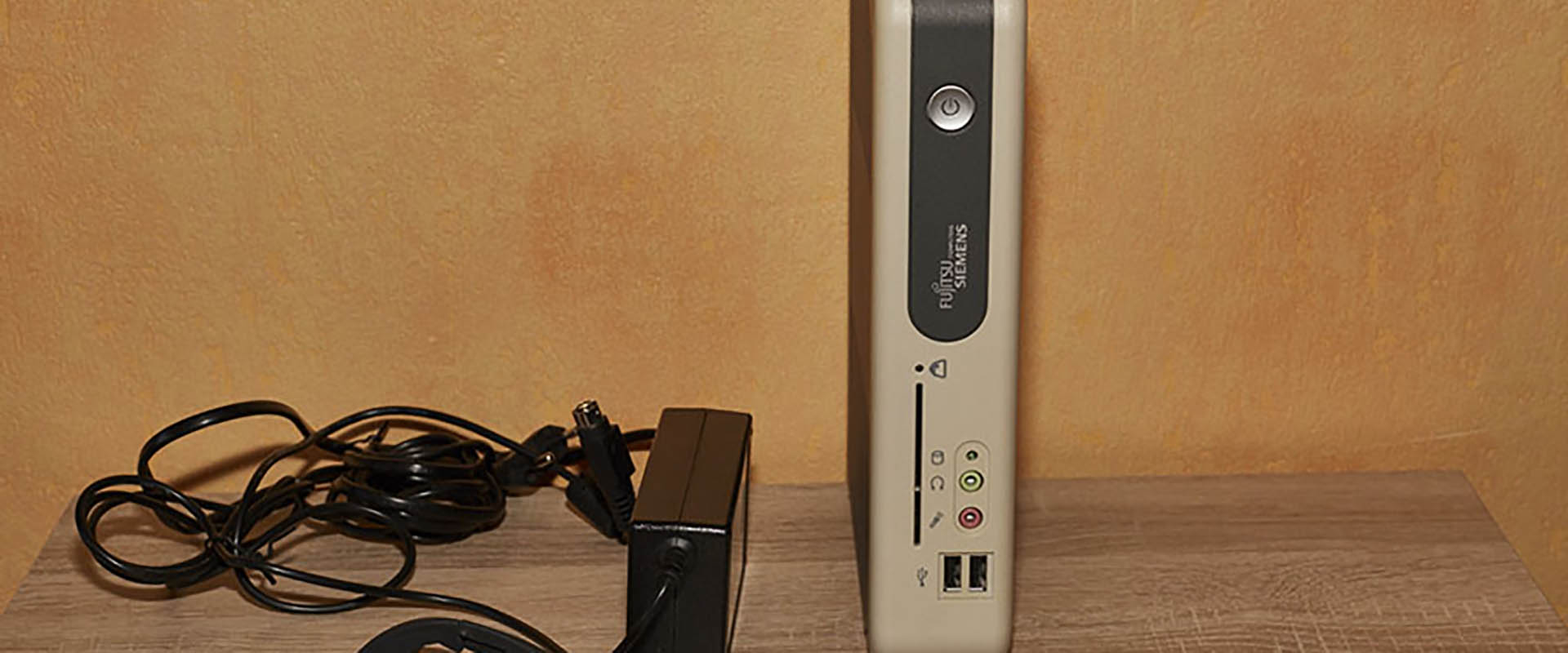
The Fujitsu Futro S400
This sleek, little device stands upright, taking up minimal space. It comes with an external power supply, eliminating even the need for a power supply fan. It does produce some heat, but that’s hardly an issue. When placed openly, it’s barely noticeable. Only in confined spaces, like in a cabinet as in my setup, does the top of the cabinet get mildly warm. As for its specs:
- 1 GHz AMD Processor
- Maximum 60 Watts
- Height: 25cm
- 256 / 512 MB RAM
- Storage via CF card
- 4x USB ports (2x USB 2.0, 2x USB 1.1 in my case)
- VGA, RS-232, Parallel, PS/2 ports
- 1 PCI slot with riser card
- Gigabit Ethernet
- 1 IDE slot
While it's not the fastest or most modern device, it's perfectly adequate for a small Linux server handling non-intensive processes. The use of a CF card adds flexibility and affordability to the setup. In my case, a spare 4GB CF card works fine, with about 2GB left free after installing the operating system and various programs/scripts.
Device and Linux Installation
As the S400 is purchased used, it generally comes with all necessary components. Just add a CF card, such as a 16GB CF card. Insert it, connect the power (RAM is usually included), and you're set to go. A great feature of the S400 is its ability to boot from USB, so just connect an external DVD drive, insert a Linux installation CD, and start the installation. In the BIOS (accessed by pressing delete, F1, or F2 during boot, depending on the model), ensure USB boot is enabled and the boot order is correct. I chose Debian Linux for its reliability and because the latest installer CD is always at hand. The installation process is straightforward, like installing on any hard drive. I selected only the basic installation, Web, SQL, SSH, and file server packages, omitting graphical interfaces and other unnecessary features to save space. Following the installation guide, you’ll eventually have a fully functional Debian Linux system running on the CF card.
Next Steps
With the server set up and running quietly, you can access it via SSH. Windows users can use puTTY (simply enter the IP address; the standard port is 22). Mac users can open Terminal (Applications -> Utilities -> Terminal) and type:
ssh 192.168.0.5
(replacing with your server's IP address).
In the second part of this series, I’ll show how to set up an affordable mini-NAS with an external hard drive on this small Debian server.
As you can see in the title image, it fits perfectly in a cabinet designed for two levels of file folders, making it easy to integrate into any space. Sure, there are smaller Mini-ITX computers with Wi-Fi and other features, but not at this price point if you're looking for an affordable, DIY solution.
Usage
root@s400:~# cpufreq-info
cpufrequtils 008: cpufreq-info (C) Dominik Brodowski 2004-2009
Report errors to [email protected].
analyzing CPU 0:
Driver: powernow-k7
The following CPUs run at the same hardware clock speed: 0
The clock speed of the following CPUs is software-coordinated: 0
Maximum duration of a clock speed change: 200 us.
Hardware limits of clock frequency: 667 MHz - 1000 MHz
Possible clock frequencies: 667 MHz, 800 MHz, 1000 MHz
Possible governors: powersave, userspace, conservative, ondemand, performance
Current policy: The frequency should be within 667 MHz and 1000 MHz.
The "ondemand" governor may decide any frequency within this range.
Current clock frequency is 667 MHz (verified by hardware query).
Statistics: 667 MHz:99.36%, 800 MHz:0.03%, 1000 MHz:0.61% (12)
To my knowledge, I've never had issues with the processor running at 100%. In idle state (with only SQL, Apache, etc., running), the processor is barely utilized, resulting in the following readings:
root@s400:~# cat /proc/loadavg
0.05 0.05 0.05 1/119 2867

root@s400:~# cat /proc/meminfo
MemTotal: 221976 kB
MemFree: 71236 kB
Professionelle Arbeit
Wenn aus einer Technologiefrage ein echtes Projekt wird
Bei Neoground geht es darum, komplexe Technologie verständlich, tragfähig und umsetzbar zu machen — von Software und Infrastruktur bis zu KI, Architektur und strategischen Technologieentscheidungen.

Hat jemand Erfahrungen mit der Nutzung des Fujitsu Futro S400 Thinclient als Mini-Server für ungewöhnliche Anwendungen, wie zum Beispiel das Erkennen von Gesichtern in CCTV-Systemen oder das Trainieren von Maschinellen Neuralen Netzen?